API Chaos Testing for Frontend Developers: A Practical Introduction
Two springs ago we shipped what looked like a textbook profile page. Avatar, name, role badge, last-seen timestamp. It rendered perfectly in staging, perfectly in code review, perfectly on three reviewer machines on the office Wi-Fi.
The morning after release, about 14% of our users started seeing a white page where the profile was supposed to be. The cause was embarrassingly small: one user record where avatarUrl was the literal string "null" — four lowercase characters — because of a CSV import bug from two years before. Our code did if (user.avatarUrl) <img src={user.avatarUrl} />. The string "null" is truthy. The browser fetched https://app.example.com/null, got a 404, and a few lines down our component assumed the image had loaded and read imgRef.current.naturalWidth. Boom.
I wasn't going to find that bug with a clean users.json and three rows of Alice, Bob, Charlie. The only way to find it on day one was to deliberately feed the UI a payload that looked almost-but-not-quite right. Which, in hindsight, is the whole point of chaos testing for the frontend.
This post is about how we ended up building two features into Mimicry to make that kind of testing the default, not the afterthought: Chaos Mode for the request itself, and Field Chaos for the data inside it.
Happy paths are not a test plan
Most frontend bugs do not live on the happy path. They live in the corners:
- The request that takes three seconds and the user clicks the button twice
- The 500 that arrives on the second poll, not the first
- The optional field that is missing on 3% of records because a migration ran sideways
- The
stringyour TypeScript interface promised, but a Python service serialised as a number
If your dev environment only ever produces a clean 200 OK with the canonical payload, none of those corners ever get exercised until production. I wrote a whole separate piece on why static JSON mocks make this worse, but the short version is: a fixture gives you exactly one scenario, in zero milliseconds, with no error path. It is useful for prototyping a layout. It is not a test plan.
Chaos testing on the backend is an old idea — Netflix wrote about Chaos Monkey in 2011. On the frontend it has been weirdly slow to land, even though our environments fail in many more interesting ways than a server does.
Chaos Mode: making the endpoint misbehave on purpose
Chaos Mode in Mimicry turns a normal mock endpoint into one that occasionally fails or stalls. You configure it per endpoint, or per HTTP method on a CRUD resource (so you can chaos the POST /users without touching GET /users), and the mock server applies the rules every time it answers.
There are two knobs:
- Random failure — a percentage of requests are answered with a configurable HTTP error (
401,403,404,422,500, or your own). Set it to 100% to test your error UI directly, or to 20% to surface the much nastier "fails twice, succeeds on the third retry" path that hides most production bugs. - Random latency — a delay in
fixedmode, or arange(e.g. 800–3500 ms). Range is what I almost always use, because real networks are not consistently slow, they are unpredictably slow, and that is what breaksuseEffectcleanups, double-fetch protection and stale closures.
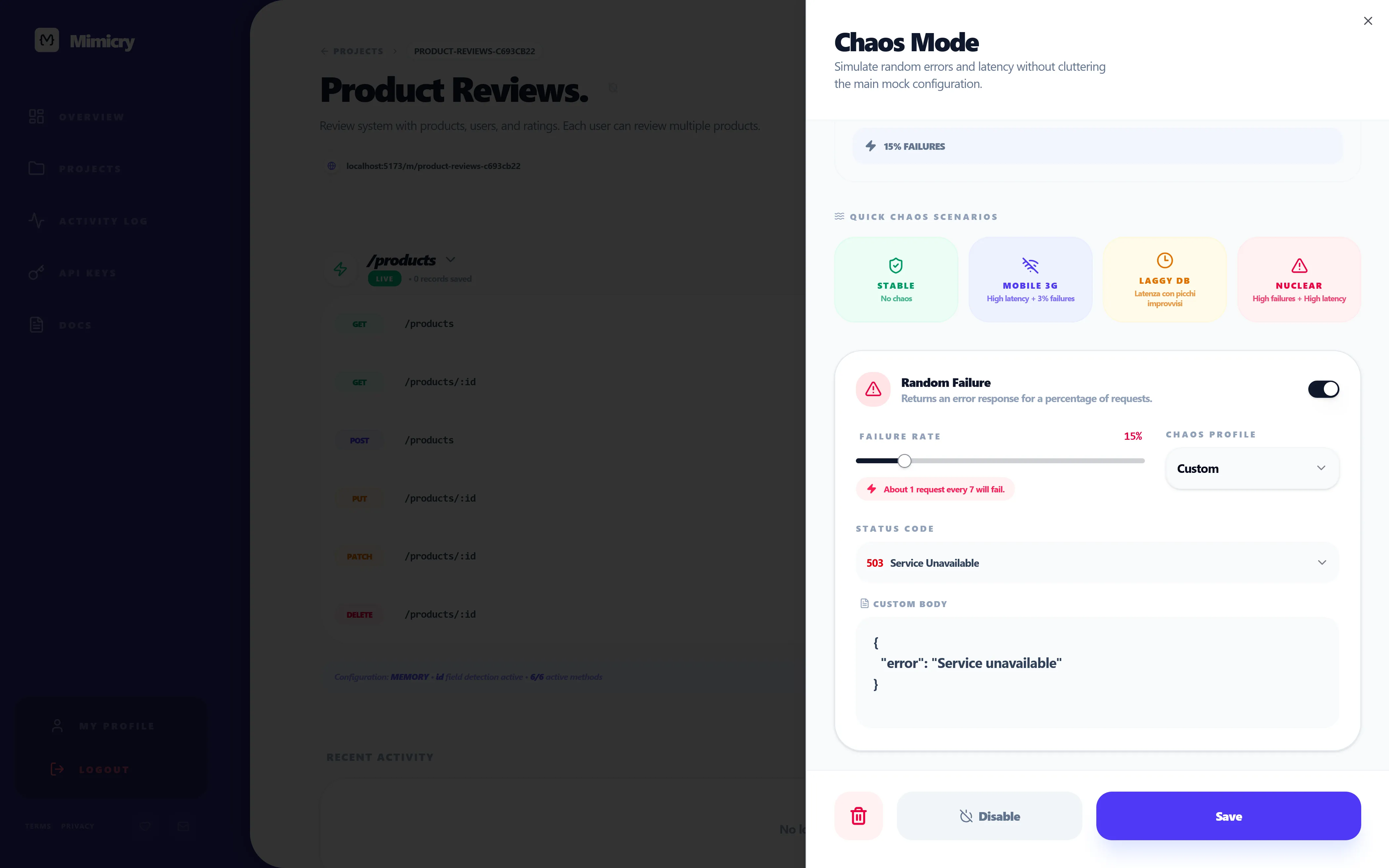
There is also a row of quick presets at the top of the sheet — Flaky network, Slow API, Backend on fire, that sort of thing — for when you do not want to think about percentages and just want to break the page in a known way. I use them more than I expected to. The 60 seconds between "I wonder if this is resilient" and "the page is now broken on purpose" is what makes the difference between testing chaos and intending to test chaos one day.
A small detail that matters more than it should: the sheet shows a reliability score derived from your current settings. When you have failure at 40% and latency at "2–6s range", it reads "23% reliable", which is a useful cold splash of water before you wire that endpoint into a demo.
Here is what naive code looks like when Chaos Mode is on:
async function fetchStats() {
  const response = await fetch("/api/stats");
  return response.json();
}
That snippet works perfectly with a static mock. With Chaos Mode at 30% failure and 1–3s latency, it produces, in roughly this order: a frozen page, an unhandled promise rejection in the console, and an angry Slack message. The honest version is closer to:
async function fetchStats(signal?: AbortSignal) {
  const response = await fetch("/api/stats", { signal });

  if (!response.ok) {
    throw new Error(`stats request failed: ${response.status}`);
  }

  return response.json();
}
…and then your component renders three branches (loading, error, data) on top of that. Chaos Mode does not write the resilient version for you. It makes the non-resilient version unbearable to keep, which is a different and better incentive.
(For people using React Query, this is also where the difference between isFetching and isLoading finally bites — most teams pick the wrong one for background refetches and only notice once the network actually slows down.)
Field Chaos: messing with the payload itself
Down servers and slow networks are the easy part. The harder bugs come from a 200 OK whose body is not what you assumed.
That is what Field Chaos is for. Instead of corrupting the whole response, it corrupts individual fields of the mock, with three mutually-exclusive probabilities you set per field:
- Null rate — the field arrives as
null. The classicCannot read properties of null (reading 'foo')generator. - Omit rate — the field disappears entirely from the JSON. Different from
nullbecause"name" in payloadis nowfalse, which trips a different set of bugs (optional chaining, JSON schema validators,Object.entriesloops). - Invalid rate — the field shows up, but with the wrong shape. And critically, you choose the exact wrong value via the
invalidValuetextarea (a number where a string was promised, an object where an array was, the literal string"null"if you want to recreate the bug from the top of this post).
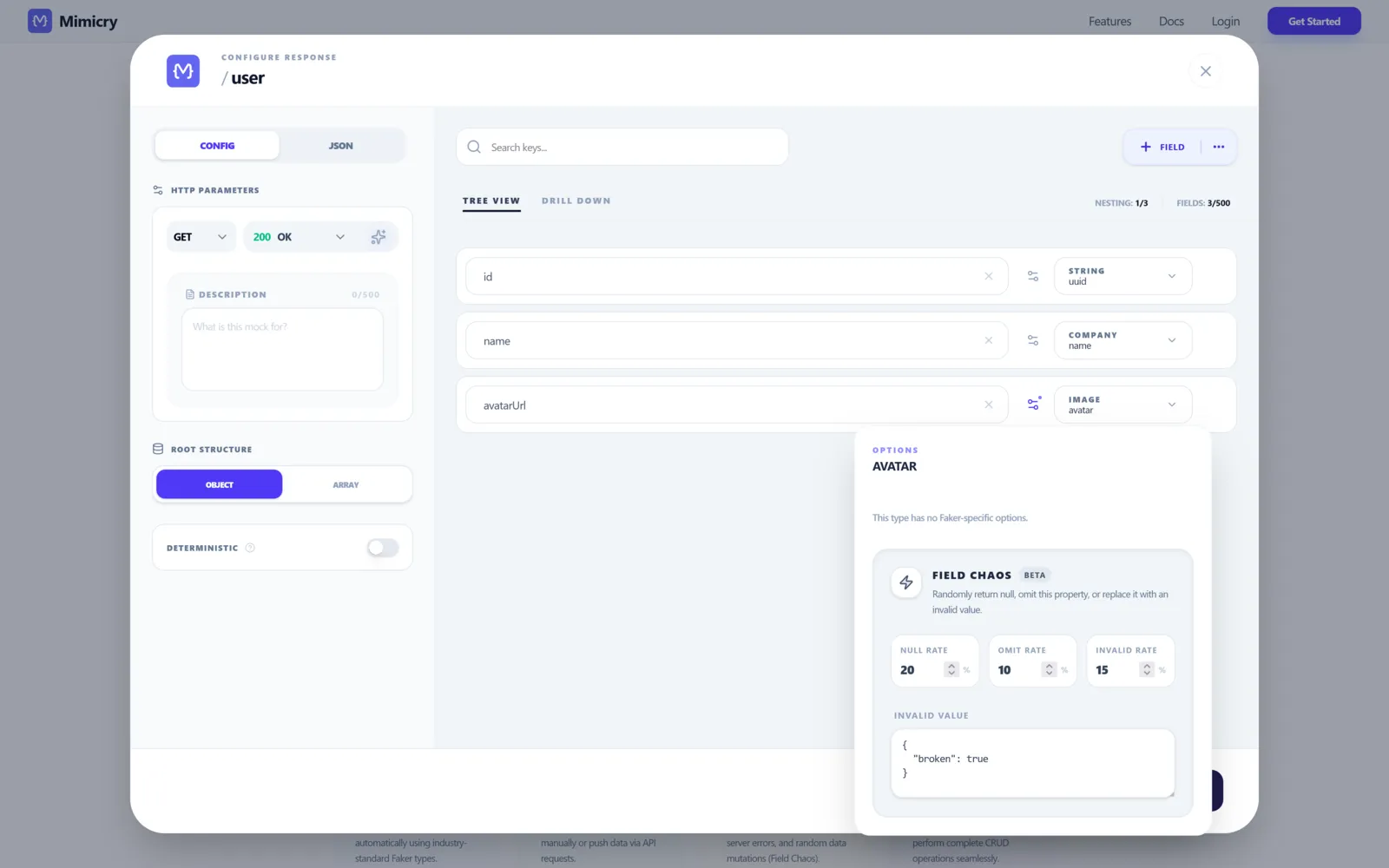
A few things worth flagging because they are not obvious from the screenshot:
- The three rates must sum to ≤ 100. If you set 50 / 30 / 30 the UI flips red — they are alternatives, not stacked.
- Field Chaos is currently marked Beta in the panel. It works well on the cases we have hit so far, but expect rough edges around deeply nested fields.
- Because you control
invalidValueexplicitly, Field Chaos doubles as a regression test for known bad payloads. We have one configured permanently withinvalidValue: "null"on every URL-typed field, which is exactly the regression that caused the white-screen story above.
The runtime defense is just data validation at the boundary. Zod is the most popular pick right now, but the pattern works with any schema library:
import { z } from "zod";

const UserSchema = z.object({
  id: z.string(),
  name: z.string(),
  avatarUrl: z.url().nullable().optional(),
});

type User = z.infer<typeof UserSchema>;

async function fetchUser(id: string): Promise<User> {
  const response = await fetch(`/api/users/${id}`);
  const raw = await response.json();

  const parsed = UserSchema.safeParse(raw);
  if (!parsed.success) {
    throw new Error("invalid user payload");
  }

  return parsed.data;
}
The win is not the schema itself — it is that the bad payload stops at the boundary, before it reaches useState. Once a malformed value is inside your state tree, every component that reads from it is now a separate bug. safeParse is the wall.
One mistake I made the first time around: I tried to be clever with z.coerce.number() to "accept" string numbers from a misbehaving backend. The thing happily turned "banana" into NaN, the field passed validation, and NaN propagated into a chart. Coercion is not validation. (Zod's own docs are explicit about this, I just chose not to read them.)
Where this sits next to MSW, Mirage and friends
This part matters because none of these tools are mutually exclusive, and pretending they are is a way to pick the wrong one.
- MSW (Mock Service Worker) — request-level interception inside the browser or Node, perfect for unit and integration tests. Lives in your repo. We use it alongside Mimicry, not instead of it. Less convenient when you want a designer or an iOS dev to hit the same mock, because the mock only exists when your bundle is running.
- Mirage JS — factory-based, very expressive, tied to your app bundle. Excellent if your team is fully bought in. Heavier setup. Same "lives in the bundle" tradeoff as MSW.
- json-server — five-minute prototype, single JSON file, REST for free. No first-class concept of latency, failure rates, or per-field mutations. Hits a ceiling fast.
- Mimicry — hosted, chaos-first. Same mock URL is reachable by your frontend, your CI, your QA, and your mobile teammate without anyone running your repo. Latency, failure rate, and per-field mutation are not bolted on, they are the actual product. Guest mode means the first endpoint costs you no signup.
Personally I run MSW for unit tests and a hosted Mimicry mock for everything else — pnpm dev, Storybook, the demo for the design review, the iOS team's simulator. The boundary between the tools is "is the mock part of the test, or part of the environment?". Both answers are valid.
Things I got wrong the first time
A few traps that cost me an afternoon each, so they do not cost you one:
- Failure rate at 100% during development. You will spend an hour debugging your retry logic before remembering you told the mock to always fail. Use a percentage like 30–40% so you also catch the "succeeds on retry" path, which is where most flaky-test bugs live.
- Field Chaos
invalidValuethat is still valid. I once set the invalid value of anamefield to the string"INVALID", expecting things to break. The component happily rendered "Welcome, INVALID". The bug was in my chaos, not in my UI. Pick values that violate the schema (wrong type, wrong shape), not values that look wrong to a human. - Forgetting chaos is scoped per endpoint. Toggling Chaos Mode on
/usersdoes nothing to/posts. Apply at the CRUD resource level when you want every method to misbehave, at the method level when you only want to torturePOST. - Treating chaos as a one-off test. The whole point is that it stays on during development, not that you flip it on for ten minutes before a demo. The 14% white-screen bug from the top of this post survived multiple "we tested it" pre-launches. It would not have survived two days of development with Field Chaos
nullRate: 5onavatarUrl.
What you actually take away from this
Chaos testing is not a tool you adopt, it is a default you change. The tool is the easy part — Mimicry, MSW, Mirage, even a sleep statement in a hand-rolled mock would technically do it. The hard part is being willing to develop against a UI that is sometimes slow and sometimes wrong on purpose, instead of one that is always instant and always clean. The first day is uncomfortable. By the end of the week the alternative feels naïve.
If you want to try this without signing up, you can spin up your first mock endpoint as a guest at Mimicry's features page and have Chaos Mode and Field Chaos on it in about a minute. If you would rather start from the other end and design your UI around the four states first, the companion piece is How to Test Loading, Empty, Error, and Success States with a Mock API.
Either way: turn it on, leave it on, ship code that survives.
Ready to try it yourself?
Stop waiting for the backend. Use Mimicry to create a mock API, launch a mock REST API generator, or share a hosted mock API with your team.
Create a Mock API