Conditional API Responses: One Mock Endpoint, Every User State
The dashboard looks perfect on your screen. Team settings, billing, the audit log — every panel exactly where it should be. Then a customer writes in: their teammate logged in and saw a billing page they were never supposed to touch. And it won't reproduce, because your account is an owner. You've been building and "testing" the only version of the UI you're ever able to see.
That's the trap with role-based interfaces. It isn't a loading bug or an empty-state bug — it's a you bug. You only ever experience the app as the account sitting in your dev database, and every other reality — the member, the read-only viewer, the suspended account, the trial that expired yesterday — stays invisible until someone hits it in production.
The usual fixes are all a little sad. You spin up three throwaway accounts and keep logging in and out. You hardcode role = "member" in a component and forget to take it out. Or you create three near-identical mock endpoints — /me-admin, /me-member, /me-suspended — and wire your app to whichever one you're poking at today. None of that is testing the real thing. The real thing is one endpoint that answers differently depending on who's asking.
That's exactly what conditional responses are for.
What a conditional response actually is
In Mimicry, a normal mock endpoint returns one shape: a Faker schema for a simple mock, or your persisted records for a CRUD resource. A conditional response is a rule you attach to that same endpoint. Each rule is two halves:
- a condition on the incoming request — a query param, a header, or a field in the JSON body. The match itself is deliberately small:
eq(equals),contains(substring), andexists/not_existsfor when you only care whether a thing is there at all. No greater-than, no regex — on purpose, so a rule reads in two seconds. - a response to return when that condition matches — a status code and a body.
One wrinkle worth knowing up front: a body condition only fires on POST, PUT, and PATCH, because there's nothing to inspect on a GET or DELETE. Query and header conditions work on every method — which is why the suspended-account rule a few paragraphs down keys off a header instead.
You can stack several rules and nudge them into order with the up/down arrows. When a request comes in, Mimicry walks the list top to bottom and the first one that matches wins. If none match, the endpoint falls back to its normal response. No code branches, no duplicate endpoints, no logging in and out.
The mental model is a switch statement that lives in your mock instead of in your frontend.
The concrete case: one /me endpoint, three humans
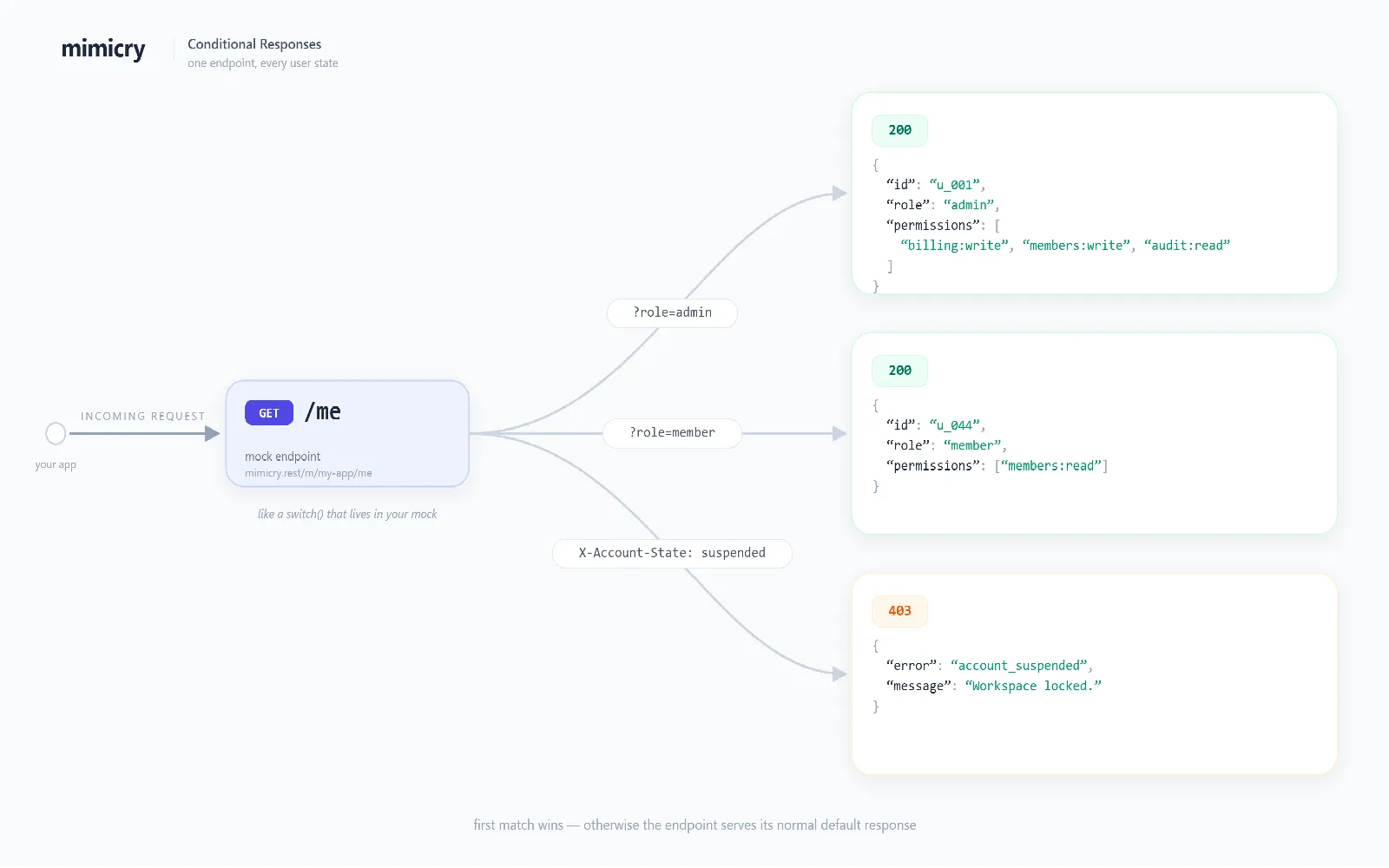
Let's wire that dashboard the way it should be done from the start. Say your app loads the current user from GET /me, and your project slug is my-app, so the live URL is https://mimicry.rest/m/my-app/me.
Out of the box that endpoint returns your default Faker payload. Now we add three rules.
Rule 1 — the admin. Condition: query role eq admin. Response: 200 with the full payload.
{
  "id": "u_001",
  "name": "Ada Owner",
  "role": "admin",
  "permissions": ["billing:write", "members:write", "audit:read"]
}
Rule 2 — the member. Condition: query role eq member. Response: 200, but a deliberately thinner object.
{
  "id": "u_044",
  "name": "Glen Member",
  "role": "member",
  "permissions": ["members:read"]
}
Rule 3 — the suspended account. Condition: header X-Account-State eq suspended. Response: 403.
{ "error": "account_suspended", "message": "This workspace is locked." }
Now the same endpoint tells three different truths, and you choose which one by shaping the request:
# The owner's view
curl "https://mimicry.rest/m/my-app/me?role=admin"

# The member's view — the one you never see
curl "https://mimicry.rest/m/my-app/me?role=member"

# The locked-out view
curl "https://mimicry.rest/m/my-app/me" -H "X-Account-State: suspended"

# No rule matches → your normal default response
curl "https://mimicry.rest/m/my-app/me"
In the actual app you don't even need to change code to walk through these. Point your data layer at the mock and flip a query param in the URL bar:
const role = new URLSearchParams(location.search).get("role") ?? "";
const res = await fetch(`https://mimicry.rest/m/my-app/me?role=${role}`);
const me = await res.json();
Suddenly the member view is one keystroke away. The suspended state is a header in your REST client. The kind of permissions bug that usually ships to production becomes a thirty-second check instead of a customer email.
Order matters, and that's the point
Conditions are evaluated by priority, top wins. That ordering is a feature, not a footnote.
Put a broad rule above a narrow one and the broad one always swallows it. A good habit: most specific at the top, most general at the bottom. For our /me example, the suspended 403 should usually sit above the role rules — a locked account shouldn't get an "admin" payload just because the URL still says ?role=admin. Bump it to the top with the arrows and "locked beats everything" becomes literally true, read straight down the list.
It reads like the same precedence you'd write by hand, except you can see it, reorder it, and hand it to a teammate without explaining a single if.
It works on CRUD resources too — including the list
This isn't only for single-object mocks. Attach a rule to a CRUD resource and it applies to the whole resource, on every method it serves.
The classic case is a list that should look different per role. GET /users?role=admin can return your full seeded list, while a rule on ?empty=true returns [] so you can finally see your empty state on demand:
# Your normal paginated list
curl "https://mimicry.rest/m/my-app/users?page=1&limit=20"

# A rule matches → the canned body, returned verbatim
curl "https://mimicry.rest/m/my-app/users?empty=true"
One thing worth knowing, because it's the most useful and the most surprising part: when a rule matches on a CRUD resource, the response goes back the way you wrote it — or the way Faker generated it, if that's how you set the body. Either way it skips the data store, pagination, sorting, filtering, and the { data, meta } wrapper. A match is a clean override, not a filter layered on top of your records. So ?empty=true hands you a bare [], not an empty page envelope — which is usually what you want when you're hunting an empty-state bug.
Because a CRUD query param like ?role=admin normally drives filtering, just be deliberate: if you key a rule on the same param you filter by, a matching request returns the canned response instead of the filtered list. When you want zero overlap with your filters, condition on a header instead. Same power, no collision.
Where it fits next to Chaos Mode
If you've used Mimicry before, you know Chaos Mode for shaking the connection — random failures, latency, spikes. Conditional responses are the calm sibling. Chaos asks "what happens when the network misbehaves?" Conditional responses ask "what happens when the data is different?" One is about the pipe, the other is about the payload.
They compose nicely — with one thing to keep in your head. Chaos is evaluated before the conditions, so on any request where chaos decides to fail, your conditional rule never gets a say. Most of the time that's what you want (a flaky connection dies before the payload matters), but it's the reason a rule that "should" have matched can still come back broken: chaos got there first. When you're trying to read a conditional response cleanly, turn the chaos percentage to zero, then dial it back up once you've seen the shape you were after.
With that out of the way: drive your happy paths and role states with conditional responses, then add a little chaos to check that the member view degrades gracefully when the request is also slow or flaky. The reusable error bodies you've saved in your Response Library work as conditional bodies too, so a 401 Token Expired you defined once can be the response for "no auth header present" here.
Why this beats the workarounds
It's worth saying plainly what you get back:
- One source of truth. The states of a screen live next to the endpoint, not scattered across throwaway accounts and commented-out code.
- Nothing to clean up. No
role = "member"left in a component, no/me-admin-v2endpoint nobody dares delete. - A shareable reproduction. "Open
?role=member" is a sentence a designer, a QA engineer, or a bug report can act on. A local fixture isn't. - Honesty. You're testing the same endpoint your app calls in production, just answering as a different person.
Role-based UI doesn't break on the happy path. It breaks on the account that isn't yours. The fastest way to stop shipping those bugs is to make every version of "you" a request away — and then actually go look at each one before your users do.
Most teams learn that the expensive way, one bug report at a time. You can skip it for the price of three rules.
Ready to try it yourself?
Stop waiting for the backend. Use Mimicry to create a mock API, launch a mock REST API generator, or share a hosted mock API with your team.
Create a Mock API