How to Use Claude Code and Cursor to Build Mock APIs with Mimicry MCP
Mock APIs are iterative by nature. You start with one endpoint, build a component, discover you need another field, add it, ship the component, realize you need a stats route, add that too. Each of those additions is a round trip: editor, browser, Mimicry dashboard, back to editor.
That round trip is small. But it accumulates. By the fifth iteration of the same feature, the friction of "I should update the mock" is real enough that things get deferred. The field gets added when someone notices it's missing. The endpoint gets created the morning before the demo. The mock stops keeping pace with the code.
MCP — Model Context Protocol — is the thing that changes this. Connect Mimicry to Claude Code, Cursor, or Windsurf, and the mock can be managed from the same place as the code: same terminal, same editor, same conversation. This post covers what MCP is, why it fits particularly well with API mocking, and how to set it up end to end — with a to-do app as the working example.
What MCP actually is
MCP stands for Model Context Protocol. It's an open standard that lets AI assistants connect to external tools and APIs in a structured way. The AI doesn't just read and write files anymore — it can call tools, query systems, and take actions in external services.
If you've used Claude Code's ability to read your codebase and run shell commands, MCP is the same idea extended to anything outside your machine. Instead of the AI being limited to what it can see on disk, it can now talk to services that expose an MCP server — and do things in those services on your behalf.
The important part is that it's explicit and scoped. When you connect Mimicry to your AI assistant, you create a
token with specific permissions. projects:read means the AI can list your projects. mocks:write means it can
create and update endpoints. It can only do what the token allows, and nothing more. That's a meaningful safety
property when you're letting an AI write to something that affects your development workflow.
MCP is supported in Claude Code, Cursor, Windsurf, and Claude Desktop. The protocol is the same across all of them — you configure it once and the same tools work regardless of which editor you're in.
Why mock APIs and MCP are a particularly good pairing
Mock APIs are inherently iterative. You start with one endpoint, build the component that uses it, realize you need a
second field, add it, ship the component, discover you need a stats endpoint, add that too. Every iteration is a
round trip: editor → browser → Mimicry dashboard → back to editor.
That round trip is the problem MCP solves. The iteration now happens in the same place as the building. You're writing
a React component that calls /todos. You realize you need a priority field. You tell the AI to add it. It adds it.
You keep writing the component. The context switch is gone.
There are two other benefits worth naming. The first is that intent-based API design is faster than clicking through a schema builder. Describing "a todo with an id, a title, a boolean done flag, and a created_at timestamp" takes three seconds in natural language. Clicking through dropdowns to achieve the same thing takes longer. For schemas you'd design the same way every time, this is just speed. For schemas you're figuring out as you go, it's a better way to think — you describe what you need, not how to configure it.
The second benefit shows up in teams. Not everyone who needs to modify a mock knows the Mimicry UI. A designer who
says "can you add a priority field to the todos?" usually means "someone please go into the dashboard and do that
for me." With MCP, they can ask Claude Code directly, and it happens. The barrier goes from "someone has to do it in
the UI" to "anyone can ask the AI to do it".
Setting up the connection
Step 1: Create an MCP token in Mimicry
Go to your account and open the Integrations page. Click "New Token", give it a descriptive name (I use names
like claude-code-dev or cursor-sideproject), pick the scopes you need, and set an expiry.
For a full development workflow you want four scopes: projects:read, projects:write, mocks:read, and mocks:write.
Add logs:read if you want to ask the AI about recent requests to your mock — useful for debugging.
Copy the token when it appears. It's shown exactly once. If you lose it, you create a new one.
Step 2: Connect Claude Code
claude mcp add --transport http mimicry https://mimicry.rest/mcp \
  --header "Authorization: Bearer mc_pat_YOUR_TOKEN"
Verify it's registered:
claude mcp list
You should see mimicry in the list. Test the connection by asking Claude: "List my Mimicry projects." If the token
is valid and the scopes are right, it will either list your projects or tell you there aren't any yet.
Step 3: Connect via JSON config (Cursor, Windsurf, Claude Desktop)
For editors that use a JSON configuration file:
"mcpServers": {
  "mimicry": {
    "url": "https://mimicry.rest/mcp",
    "headers": {
      "Authorization": "Bearer mc_pat_YOUR_TOKEN"
    }
  }
}
Windsurf and Antigravity use serverUrl instead of url:
"mcpServers": {
  "mimicry": {
    "serverUrl": "https://mimicry.rest/mcp",
    "headers": {
      "Authorization": "Bearer mc_pat_YOUR_TOKEN"
    }
  }
}
The location of this config file depends on the editor. In Cursor it lives in your global settings. In Claude Desktop it's in the application config. Check the editor's documentation for the exact path, but the JSON structure above is the same for all of them.
Walkthrough: building a to-do app mock from scratch
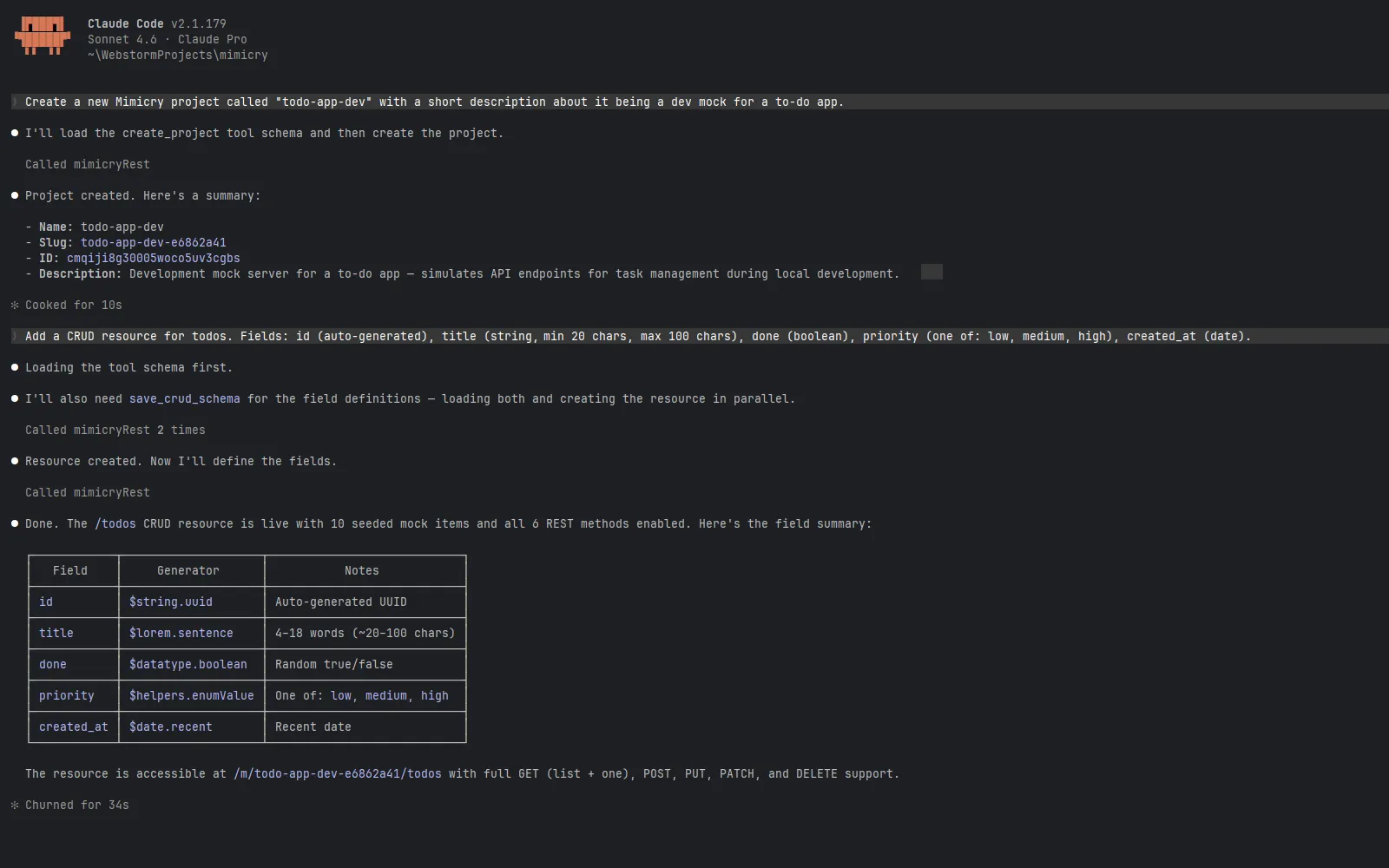
This is the workflow I actually use. You can follow along exactly.
The scenario: I'm starting a React to-do app and I want a working mock backend before I write any component code.
Create the project
Me: Create a new Mimicry project called "todo-app-dev" with a short description about it being a dev mock for a to-do app.
Claude calls create_project. The response includes the project ID, the slug, and the base mock URL — something
like https://mimicry.rest/m/todo-app-dev. That URL is already live.
Add the main CRUD resource
Me: Add a CRUD resource for todos. Fields: id (auto-generated), title (string), done (boolean), priority (one of: low, medium, high), created_at (date).
This is a two-step operation under the hood. Claude first calls add_crud_resource to register the resource and
its REST methods, then calls save_crud_schema to define the field types and seed the initial data. save_crud_schema
maps your natural language description to Mimicry's Faker generators: id becomes $string.uuid, title becomes
$lorem.sentence, done becomes $datatype.boolean, priority becomes $helpers.enumValue with
["low", "medium", "high"], and created_at becomes $date.recent.
What you get back is a base path /todos with five routes already working and ten pre-generated todos in the store:
GET    /todos          → paginated list of generated todos
POST   /todos          → creates a new todo (returns the created object)
GET    /todos/:id      → single todo by ID
PATCH  /todos/:id      → partial update
DELETE /todos/:id      → delete
You haven't touched a browser. The endpoints are live and returning realistic varied data.
Verify what's there
Me: List all endpoints in the todo-app-dev project.
Claude calls list_endpoints and shows you the routes with their response shapes. This is useful before you wire up
the frontend — you see exactly what the mock returns and can catch any mismatches between what you expected and what's
there.
Add a standalone endpoint
Me: Add a GET endpoint at /stats that returns an object with
total(number of todos) anddone(number of completed todos). Use realistic fake numbers.
Claude calls create_endpoint. The response shape it builds looks like:
{
  "total": 47,
  "done": 19
}
The numbers will vary on each request because Mimicry generates them fresh. If you need them to be stable across requests, you can ask Claude to set specific values instead.
Link resources with relationships
The todo app grows. Now there are users, and each todo belongs to a user. In the UI this would mean opening the Relations panel, picking the source resource, the target, and the foreign key name. With MCP:
Me: Add a users CRUD resource with id, name, and email fields. Then create a one-to-many relationship from users to todos, with a userId foreign key on todos.
Claude calls add_crud_resource and save_crud_schema for /users, then calls add_crud_relation to wire the
two resources together. The relation configuration it sends specifies relationType: ONE_TO_MANY,
foreignKeyName: "userId", and distribution parameters so the generated todos are spread realistically across users.
Once the relation exists, Mimicry unlocks nested routes and embedding automatically:
GET /todos?userId=abc          → todos filtered by user
GET /users/abc/todos           → same, via nested route
GET /users/abc?_embed=todos    → user object with todos array inlined
If you want to check what relations are currently configured:
Me: List all relations in the todo-app-dev project.
Claude calls list_crud_relations and returns the full relation graph — source resource, target, type, and foreign
key name. Useful when you're onboarding a new teammate onto an existing mock and want to explain the data model
without opening the dashboard.
To remove a relation that's no longer needed:
Me: Remove the relationship between users and todos.
Claude calls delete_crud_relation. The foreign key fields stay in the existing records, but the relation logic
(nested routes, auto-population, embedding) is disabled immediately.
Point the app at it
Back in the codebase:
VITE_API_URL=https://mimicry.rest/m/todo-app-dev
That's the only change the frontend needs. Every fetch call that was pointing at a hardcoded localhost address now
has a real URL. The component doesn't know the difference. Six months from now, when the real backend ships, you change
one env variable and the app switches over.
export async function fetchTodos() {
  const res = await fetch(`${import.meta.env.VITE_API_URL}/todos`);
  if (!res.ok) throw new Error("Failed to fetch todos");
  return res.json();
}
That fetcher works against the mock today and against the real backend tomorrow. No rewrites.
Iterate when the design changes
Two weeks in, a design review adds a tags field — a comma-separated list of labels you can attach to a todo. Old workflow:
open browser, find the CRUD resource, add a field. New workflow:
Me: Add a
tagsfield to the todos resource. It should be an array of strings like "work", "personal", "urgent".
Done. No browser, no clicking.
This is the part that compounds over a project. The first time you set up the mock it saves a few minutes. By the fifth iteration, the accumulated time saving starts to matter. More importantly, the friction of "I should update the mock but it'll break my flow" goes away — because updating the mock no longer breaks the flow.
What else you can do
The tools available through MCP cover the full lifecycle of a mock:
save_crud_schema— define or redefine the field schema of an existing CRUD resource. Useful when you've already created the resource and want to change the generated data shape without deleting and recreating it.add_crud_relation— create a 1:N or M:N relationship between two CRUD resources. Enables nested routes,_embedqueries, and automatic foreign key population on POST.list_crud_relations— see the full relation graph for a project, or just for one resource. Good for understanding the data model before adding new resources.delete_crud_relation— remove a relationship when it's no longer needed.get_activity_logs— ask the AI "what was the last request to my todo mock?" and see the full request/response, including headers and body. Useful when a component isn't rendering correctly and you're not sure if the problem is the fetch or the render.get_project_stats— how many requests has this mock received? Useful for knowing whether QA has been using it.delete_endpointanddelete_project— cleanup when a prototype is done.update_endpoint— change the response status code, add latency, or modify the schema without recreating the endpoint.
One pattern I find useful: at the start of a new feature, I ask Claude to list the existing endpoints in the project before adding new ones. It'll sometimes notice that what I'm about to add already exists under a slightly different path, which saves creating duplicates.
Limitations to be honest about
MCP calls are stateless and sequential. If you ask Claude to create three related resources in one message, it calls the tools one at a time. If the third call fails for some reason, the first two are already live — there's no rollback. In practice this is rarely a problem because failed tool calls are obvious and you can just clean up manually, but it's worth knowing.
The AI infers Mimicry field types from your descriptions. It does a good job, but for complex or unusual schemas it's
worth running list_endpoints after creation to verify the fields came out the way you intended. "A 9-digit numeric string"
might get interpreted as a number rather than a string, for example.
Scopes in Mimicry are account-wide, not per-project. A token with mocks:write can modify endpoints in any of your projects,
not just the one you're working on. If you share a computer with others, or if you're working across projects that shouldn't
interfere with each other, create a separate token per project and keep them in separate editor profiles.
Final thoughts
The shift here isn't just about speed. It's about where your attention goes.
When modifying the mock costs context switches, you optimize around it — you batch up changes, you put off adding that one endpoint, you ship a component that's slightly wrong because fixing the mock felt like too much friction. When modifying the mock costs one sentence, you just do it.
The code and the mock staying in sync isn't a workflow trick. It's what lets the frontend accurately represent what production will feel like, all the way through development.
If you're new to API mocking in general, How to Mock an API for Frontend Development is the right starting point. Once the mock is set up, API Chaos Testing for Frontend Developers covers how to make it behave like a backend that's actually having a bad day — which is where the useful bugs live.
The Integrations page in your Mimicry account is where you create and manage tokens. The whole setup takes about two minutes the first time.
Ready to try it yourself?
Stop waiting for the backend. Use Mimicry to create a mock API, launch a mock REST API generator, or share a hosted mock API with your team.
Create a Mock API